LongHornSurvey.com not loading, survey code failing, or entry not going through? Here are the exact fixes for every common problem — in order of most likely cause.
- Are you on the correct URL? → longhornsurvey.com only
- Is your receipt within 7 days of your visit?
- Is your survey code entered exactly as printed — no spaces?
- Is your browser cache cleared?
5 Minutes
Sep 2026
Reynolds
Fix 1: Invalid Survey Code (Most Common Problem)
The most common LongHorn survey error is an unrecognised survey code. This usually happens for one of these reasons:
Cause A: Receipt is older than 7 days
LongHorn survey codes expire around 7 days after your visit. If your code is expired, you will see an invalid error message, but it may not explain why. Expired codes cannot be reactivated.
Solution: Try the free mail-in entry instead. You can enter the same sweepstakes for the $100 prize without needing a receipt. See the full guide at /longhornsurvey-free-entry/
Cause B: Code entered incorrectly
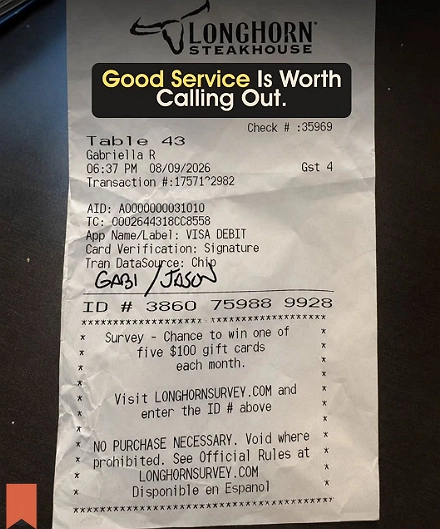
The survey code on your receipt is usually a short string of numbers or letters. Make sure to enter it exactly as shown:
- No spaces between digits
- No dashes unless the receipt shows them
- Double-check your entry, since some characters look alike, like 0 and O or 1 and I.
Cause C: Wrong URL
Some fake LongHorn survey sites exist online. If your code works at longhornsurvey.com but not elsewhere, it may be because you are not on the official site. Always enter longhornsurvey.com directly in your browser.
Cause D: To-go order receipt
If you ordered using the LongHorn app or placed a to-go order, your receipt might list lhtogosurvey.com instead of longhornsurvey.com. Codes from to-go receipts only work at lhtogosurvey.com. See the full guide at /lhtogosurvey-com-guide/
Fix 2: Survey Site Not Loading
Steps to try in order:
- Check your internet connection by opening another website to make sure you are online.
- Try a different browser. Chrome, Firefox, Safari, and Edge all support LongHornSurvey.com. If one does not work, switch to another.
- Clear your browser’s cache and cookies. Old data can sometimes cause loading problems on survey sites.
- Chrome: Settings → Privacy → Clear browsing data → Cached images and Cookies
- Safari: Develop → Empty Caches
- Firefox: Settings → Privacy → Clear Data
- Turn off your VPN. VPNs can sometimes block survey sites, especially those using Qualtrics.
- Disable any ad-blocking extensions. Tools like uBlock, AdBlock, and similar programs can block survey scripts.
- Try using a different device, such as your phone instead of your computer, or the other way around.
- Try the direct Qualtrics URL. The survey runs on Qualtrics, so you can access it directly at: dardenrestaurants.qualtrics.com/jfe/form/SV_6zZi98L7pxROxPE?Brand=LongHorn
If the site is completely down:
LongHornSurvey.com can have temporary outages. Wait 30 minutes and try again. If your receipt is close to expiring, use the mail-in entry so you do not miss your sweepstakes chance while the site is down.
Fix 3: Wrong Survey URL
This issue is more common than you might expect. Many fake or impersonation sites appear in search results for “LongHorn survey.”
Official URLs: Only these two are legitimate:
- longhornsurvey.com (for dine-in receipts)
- lhtogosurvey.com (for to-go and online order receipts)
Check your receipt first. The correct URL is printed on it. Use that exact address.
Fake domains to avoid:
Any website that is not longhornsurvey.com or lhtogosurvey.com is unofficial. Do not enter your personal details or receipt codes on any other site.
Fix 4: Receipt Has No Survey Code
Not all LongHorn receipts have a survey code. Here are some reasons this could happen:
- Your particular visit or order type doesn’t qualify for the current promotion
- The receipt printer at your location was out of the promotional batch
- You visited during a gap period between sweepstakes cycles
What to do:
Try the free mail-in AMOE entry. You do not need a code, and it is the same sweepstakes with the $100 prize. You can send up to 10 entries per period by mail. See the full guide at /longhornsurvey-free-entry/
Fix 5: Survey Completed But No Confirmation
If you answered all the questions but did not get a confirmation screen or email, try these steps:
- Check your spam or junk folder. Confirmation emails often end up there.
- Check that you entered your email address correctly. If you made a mistake, you won’t receive a confirmation, and you can’t fix it after submitting.
- Check the entry period dates. If the current period ended before you submitted, your entry may not have been registered. You can see the sweepstakes calendar at longhornsurvey.com.
- Your entry might still be valid. Sometimes confirmation emails are delayed. Wait 24 hours and check your spam folder again.
Fix 6: Survey Not Available in Your Location
LongHornSurvey.com is open to residents of the 50 United States, Washington D.C., Canada (excluding Quebec), Puerto Rico, and Guam only.
If you try to access the survey from outside these locations, your entry will not be accepted. Only use a VPN if you are a real resident of a qualifying location and are just travelling abroad.
Fix 7: Survey Already Submitted for This Receipt
Each receipt can only be used for one survey entry. If you see a message like “survey already completed,” it means that receipt has already been used.
What to do:
- Use a different receipt from another LongHorn visit.
- Try the free mail-in entry method for the current period.
Reynolds’ Summary
Most LongHorn survey problems come from three things: an expired receipt, the wrong URL, or an incorrect code entry. Start with Fix 1 and Fix 2, since they solve most issues. If nothing works and your receipt is still valid, use the mail-in AMOE method to make sure you get your sweepstakes entry.
Change Log
| Date | Update |
|---|---|
| Sep 2026 | Published. All fixes have been checked and confirmed on the current longhornsurvey.com platform. |
| Sep 2026 | Added lhtogosurvey.com to the go receipt section. |
| Sep 2026 | We have confirmed that the direct Qualtrics URL can be used as a backup way to access the system. |
Reviewed by Reynolds
In September 2026, Reynolds tried out the LongHorn survey troubleshooting process firsthand.
Last verified: Sep 2026
Contact Reynolds
Related Guides: